Pabbly Connect Review (2026): We Built a Gmail PDF → Google Drive Workflow with AgenticAI
Pabbly AgenticAI built a working two-step Gmail PDF → Google Drive workflow from a plain-English request. In our manual test, it found 10 unread Gmail messages with PDF attachments and saved all 10 PDFs to Google Drive while keeping the original filename. The result worked—but the test also exposed a few details beginners should know before turning it on for a real inbox.
- Prompt: save only Gmail PDF attachments to Google Drive and keep the original filename.
- AgenticAI generated two runtime steps automatically.
- The manual workflow test passed both steps.
- 10 matching unread messages were found and 10 PDFs were saved to Google Drive.
- The generated Gmail step marked the matching emails as read.
- For automatic recurring use, Pabbly still asked us to set a schedule.
What AgenticAI built
We described the workflow in plain English. After connecting Gmail and Google Drive, AgenticAI created:
- Fetch Emails with PDF Attachments — search Gmail for unread emails with PDF attachments and collect the attachment information.
- Save PDFs to Google Drive — download each PDF and upload it to Drive using the original filename.
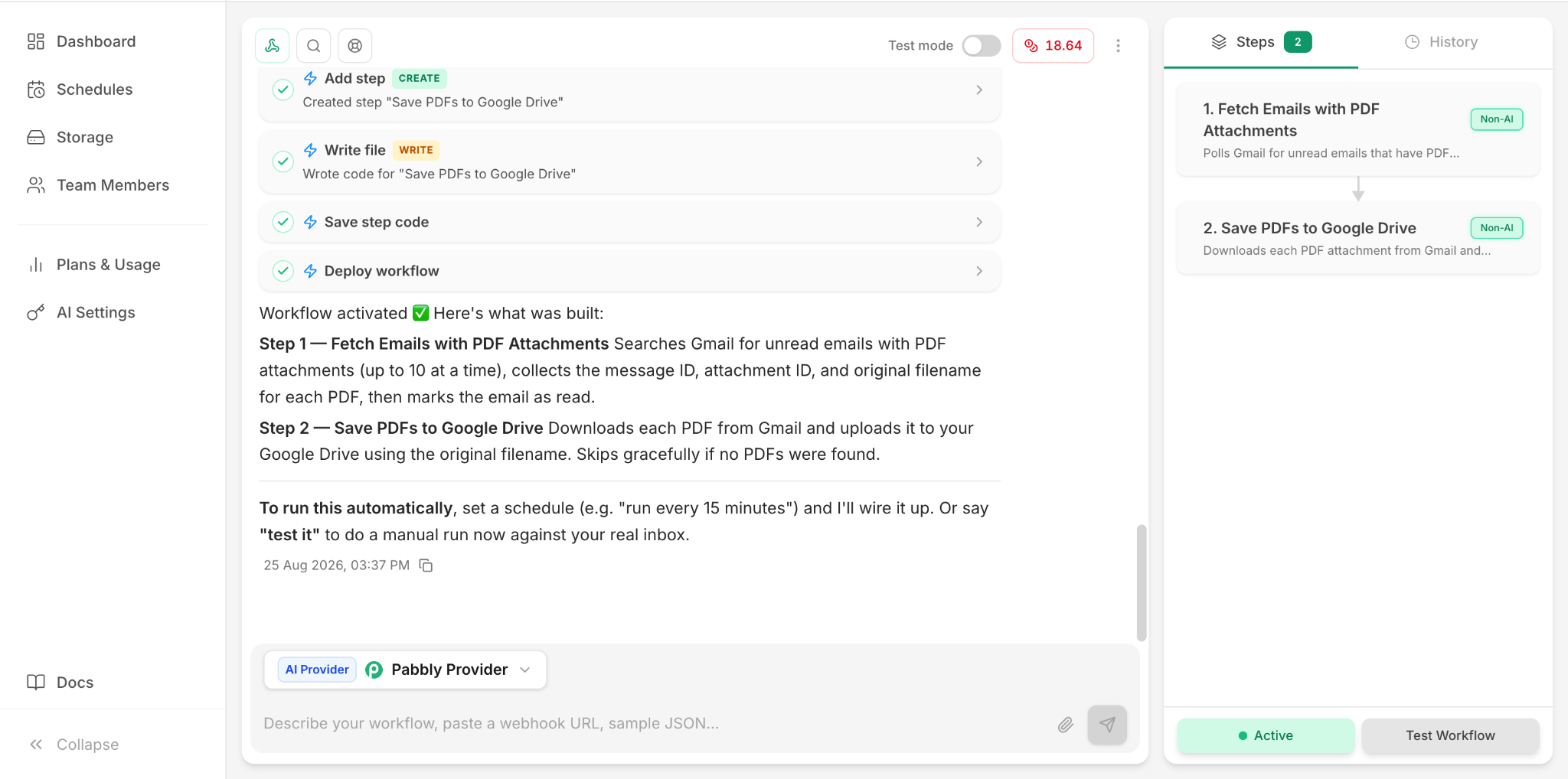
The manual test passed
We ran Test Workflow against the connected Gmail inbox. Pabbly reported that both steps passed.
- Step 1 found 10 unread emails with PDF attachments.
- Step 2 downloaded and saved all 10 PDFs to Google Drive.
- The files kept the original filename shown in our test:
test.pdf.
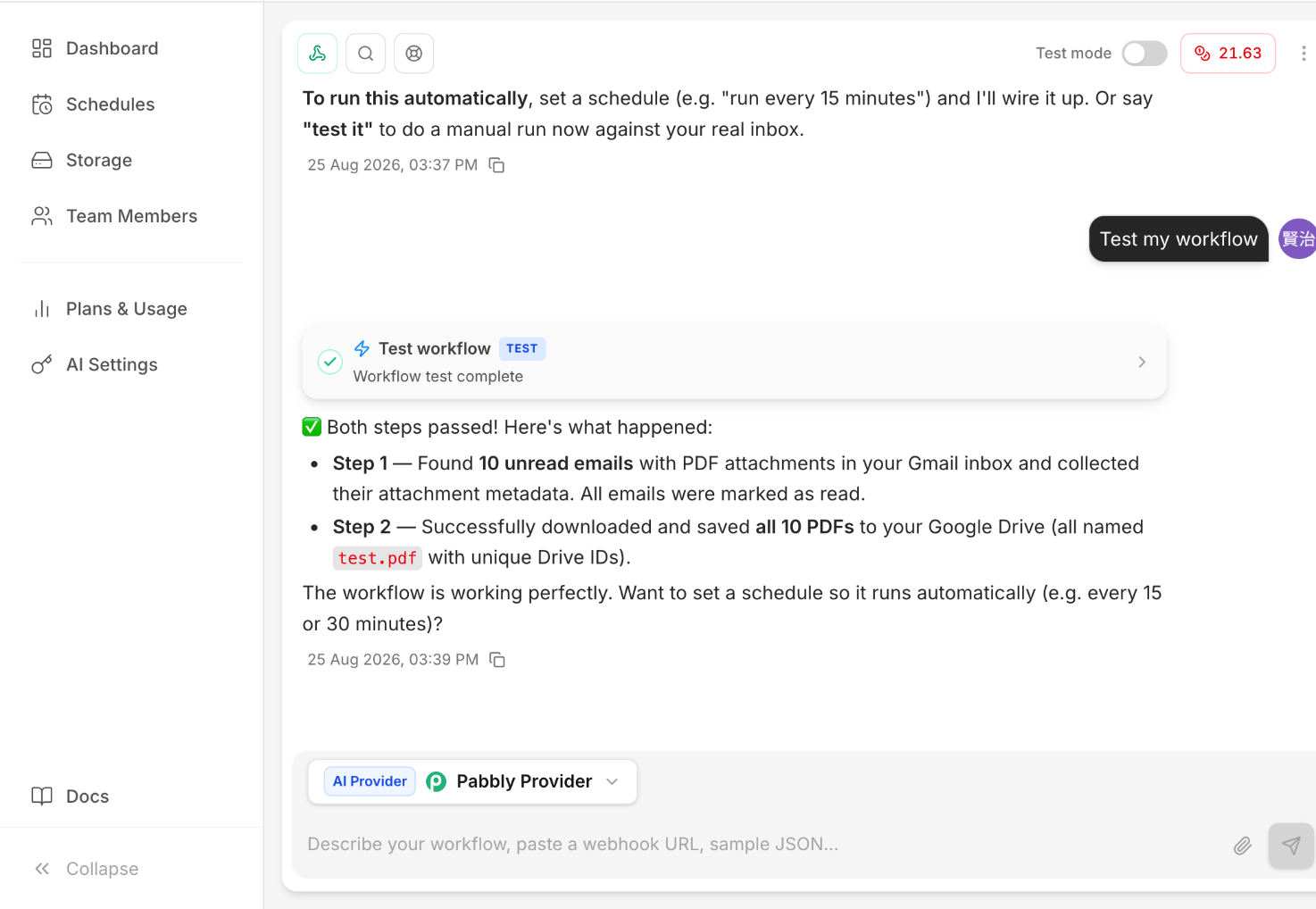
The most important caveat: it marked matching emails as read
The generated Gmail step did not merely inspect the messages—it marked the matching unread emails as read during our test. If unread status matters to your process, inspect the generated step before running it against a main inbox.
“New email” became an unread-email polling workflow
Our request described a new incoming email, but the generated workflow searched for unread Gmail messages with PDF attachments. In the manual test it processed up to 10 matching messages. We therefore would not describe this exact generated workflow as an instant new-email trigger.
You still need a schedule for automatic operation
After the successful test, Pabbly asked us to set a schedule—for example every 15 or 30 minutes—if we wanted the workflow to run automatically. Our successful result was a manual Test Workflow run, not proof of a continuously scheduled production setup.
What felt easier than expected
The strongest part of the experience was how much AgenticAI created from one natural-language instruction. The AI checked app connections, guided the account attachment process, generated the two steps, wrote the step logic, deployed the workflow, and then offered a real-data test.
Where Albato still felt simpler
Albato remains the smoothest simple setup we have tested so far. Pabbly's AgenticAI automated more of the actual workflow construction, but its connection flow involved separate authorization and Attach steps, and recurring operation still required scheduling.
Pabbly's AI builder was more ambitious; Albato's simple workflow setup felt more straightforward.
Where Make still has the strongest evidence in our library
Our Make tests go further than this Pabbly test: PDF filters, sender rules, routers, folder routing, and automatic filename transformations. We still prefer Make when the workflow is likely to grow into a more visible multi-step no-code process.
Where n8n fits
n8n remains the most technical of the tools we have tested, with binary-data handling, expressions, APIs, and self-hosting options. Our n8n affiliate application was not approved, so all n8n links on Automation Lab Guide are non-affiliate links. n8n itself does operate an affiliate program; this site simply does not have an approved n8n affiliate relationship.
Pabbly free-plan context
Pabbly's official Connect pricing currently lists a free plan with 100 tasks per month and no credit card required. Pabbly also states that trigger checks and internal steps such as filters, routers and formatters do not consume tasks in the same way as external action steps. Pricing and task rules can change, so confirm the official pricing before choosing a paid plan.
Check Pabbly Connect one-time plans → (affiliate link)
Our current verdict
| Area | Our hands-on impression |
|---|---|
| AI-assisted building | Very strong in this test — it generated the complete two-step workflow. |
| Beginner setup | Helpful, but connection/Attach steps add more friction than Albato. |
| PDF handling | Worked in our generated workflow. |
| Original filename | Preserved in the successful test. |
| Inbox side effects | Watch carefully — matching messages were marked as read. |
| Automatic production use | Requires scheduling after the workflow is built. |
| Scope of evidence | One Gmail PDF → Google Drive workflow; not yet a high-volume or complex-routing test. |
Want to try the same workflow?
Pabbly's free plan is enough to experiment with this type of workflow. The button below is a tracked affiliate link; we may earn a commission if you later purchase, at no additional cost to you.
Want the full step-by-step setup?
We documented the complete Gmail PDF → Google Drive build, including the exact AI-guided setup flow and our personal impression of how easy it felt.
Related hands-on tests
- Albato: save only PDF Gmail attachments
- Make: save only PDF Gmail attachments
- n8n: Gmail PDF → Google Drive
- Best automation tool for Gmail attachments