AUTOMATION TOOL COMPARISON · UPDATED AUGUST 2026
Make vs Zapier (2026): Which Automation Tool Should You Use?
Both Make and Zapier can automate Gmail, Google Drive, Google Sheets and thousands of other apps. But they feel very different once you build a real multi-step workflow. We tested both with the same practical task: saving Gmail attachments to Google Drive and logging the result in Google Sheets.
Make vs Zapier at a glance
| Category | Make | Zapier |
|---|---|---|
| Free usage | 1,000 credits/month | 100 tasks/month |
| Free workflow structure | Visual scenarios with routers & filters | Two-step Zaps (trigger + one action) |
| Minimum free polling interval | 15 minutes | 15 minutes |
| Integrations | 3,000+ apps | 9,000+ integrations |
| Paid entry point | Core: $12/month at 10k credits | Professional: from $19.99/month |
| Best for | Visual, flexible multi-step automation | Fast setup and broad app coverage |
Pricing and plan features change. Figures above were checked against the official Make and Zapier pricing/help pages in August 2026.
What we actually built
To avoid comparing the tools only from marketing pages, we built a working Zapier flow using Gmail, Formatter by Zapier, Google Drive and Google Sheets. The automation receives a Gmail attachment, converts the email date to YYYY-MM-DD, saves the file to Drive with the date in the filename, and records the date, sender, subject, filename and Drive link in a spreadsheet.
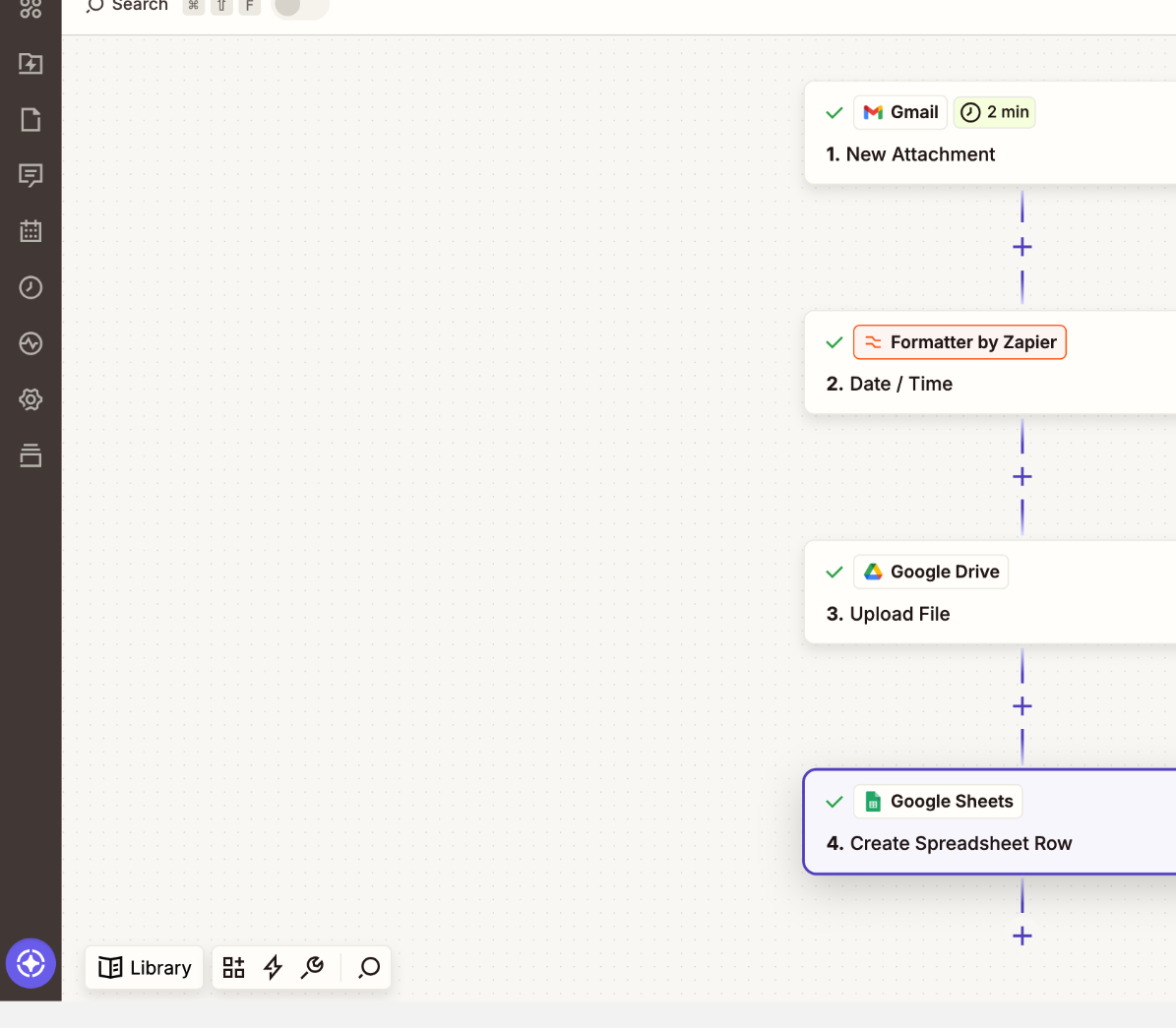
Our test produced a dated filename such as 2026-08-19_test.pdf and successfully wrote the metadata and Google Drive link into Sheets. You can see the complete setup in our step-by-step Zapier tutorial.
1. Ease of use: Zapier wins for beginners
Zapier's editor follows a straightforward vertical sequence: trigger, then actions. For a first automation, that mental model is easy to understand. Field mapping is also presented directly inside each action.
Make uses a visual canvas. That takes a little longer to learn, but the structure becomes useful when a scenario grows because you can see how modules, filters and routes connect.
2. Workflow flexibility: Make wins
Make's Free plan includes routers and filters, and its visual scenario builder is designed around connected modules. That makes it a strong choice when the workflow needs conditional routes or several processing steps.
Zapier's current Free plan allows two-step Zap workflows: one trigger and one action. The multi-step workflow we tested therefore demonstrates Zapier's workflow design, but running comparable multi-step Zaps in ongoing production generally requires a paid plan.
3. Free plan: Make gives more room to experiment
As of August 2026, Make lists 1,000 credits per month on Free. Zapier lists 100 tasks per month on Free. These units are not directly equivalent: Make generally charges credits for module operations, while Zapier measures successful work actions as tasks. Still, for learning and experimenting with multi-module scenarios, Make's free tier is particularly useful.
4. Integrations: Zapier has the larger catalog
Zapier states that its platform supports more than 9,000 integrations, while Make advertises more than 3,000 apps. If your automation depends on a niche SaaS product, checking native integration availability should be one of your first steps.
5. Pricing: Make starts lower
Make currently lists Core from $12/month for 10,000 credits. Zapier lists Professional from $19.99/month. Pricing units are different, so the cheapest plan is not automatically the cheapest workflow. Estimate how many modules/actions will execute each month before choosing.
Which should you choose?
| If you... | Our pick |
|---|---|
| Are completely new to automation | Zapier |
| Want to build visually | Make |
| Need branching and filters while learning for free | Make |
| Need the broadest integration catalog | Zapier |
| Want to learn more complex workflow design | Make |
Test before you pay
If visual branching and the Make workflow style fit your use case, test the free plan before committing.
Make link is an affiliate link.
Our recommendation for this Gmail workflow
For the Gmail → Google Drive automation used in our tutorials, we recommend starting with Make. The visual workflow is useful for understanding how each module processes data, and the free plan gives enough room to build and test practical scenarios.
Affiliate disclosure: If you register through this link, Automation Lab Guide may receive a commission at no additional cost to you.
Continue with a real tutorial
If you choose Make, start with How to Save Gmail Attachments to Google Drive Automatically with Make. If you want to see how Zapier handles the same idea, read our Zapier Gmail attachment workflow.
Sources
- Make official pricing page — checked August 2026
- Make Help Center — Credits and Operations
- Zapier official pricing page — checked August 2026
- Zapier Help Center — What's included in Zapier's Free plan?