How to Automatically Rename Gmail PDF Attachments in Make
Automatically add the current date and document type to Gmail PDF filenames while routing invoice and report attachments into separate Google Drive folders.
test.pdf was saved as 2026-08-19_Invoice_test.pdf in Invoices and 2026-08-19_Report_test.pdf in Reports.Yes. Make can rename a Gmail PDF attachment before the copy is uploaded to Google Drive. In the Google Drive module, combine formatDate(now; "YYYY-MM-DD"), a fixed label such as Invoice_, and the original attachment filename.
This guide uses Make because its visual Router, filters and mapped filenames are the parts we tested for this workflow. You can reproduce the setup on the Free plan before deciding whether you need a paid tier.
Affiliate link. If you later become a paying customer, we may earn a commission at no extra cost to you.
What changes—and what does not?
This workflow names the copy uploaded to Google Drive; it does not rename the original attachment stored in Gmail. The current setup uses now, so the filename contains the processing date, not a date read from the invoice.
Before scheduling it, check Make's Free-plan limits, including file size and active scenarios.
What we are building
Gmail — Watch emails
↓
Gmail — List email attachments and media
↓
PDF + specified sender
↓
Router
├─ invoice → Invoices → YYYY-MM-DD_Invoice_originalfilename.pdf
└─ report  → Reports  → YYYY-MM-DD_Report_originalfilename.pdf
Rename invoice PDFs with the current date
Open the Google Drive upload module on the Invoice PDFs route. Keep the destination folder as Make_Gmail_Attachments / Invoices. In New File Name, use Make's formatDate() function with now, followed by Invoice_ and 3. Filename.
Mapping pattern, not a literal copy-and-paste formula: insert the date function, type _Invoice_, then choose the attachment filename from the mapping panel. The module number is specific to our screenshot; do not type 3. Filename as ordinary text.
Date function: formatDate(now; "YYYY-MM-DD")
Fixed text: _Invoice_
Mapped value: the attachment's original filename
This creates filenames such as 2026-08-19_Invoice_test.pdf. The Gmail attachment itself remains mapped in the File field.
Rename report PDFs with the current date
Repeat the same pattern on the Report PDFs route. Change the fixed document label to Report_ and keep the destination folder as Make_Gmail_Attachments / Reports.
Date function: formatDate(now; "YYYY-MM-DD")
Fixed text: _Report_
Mapped value: the attachment's original filename
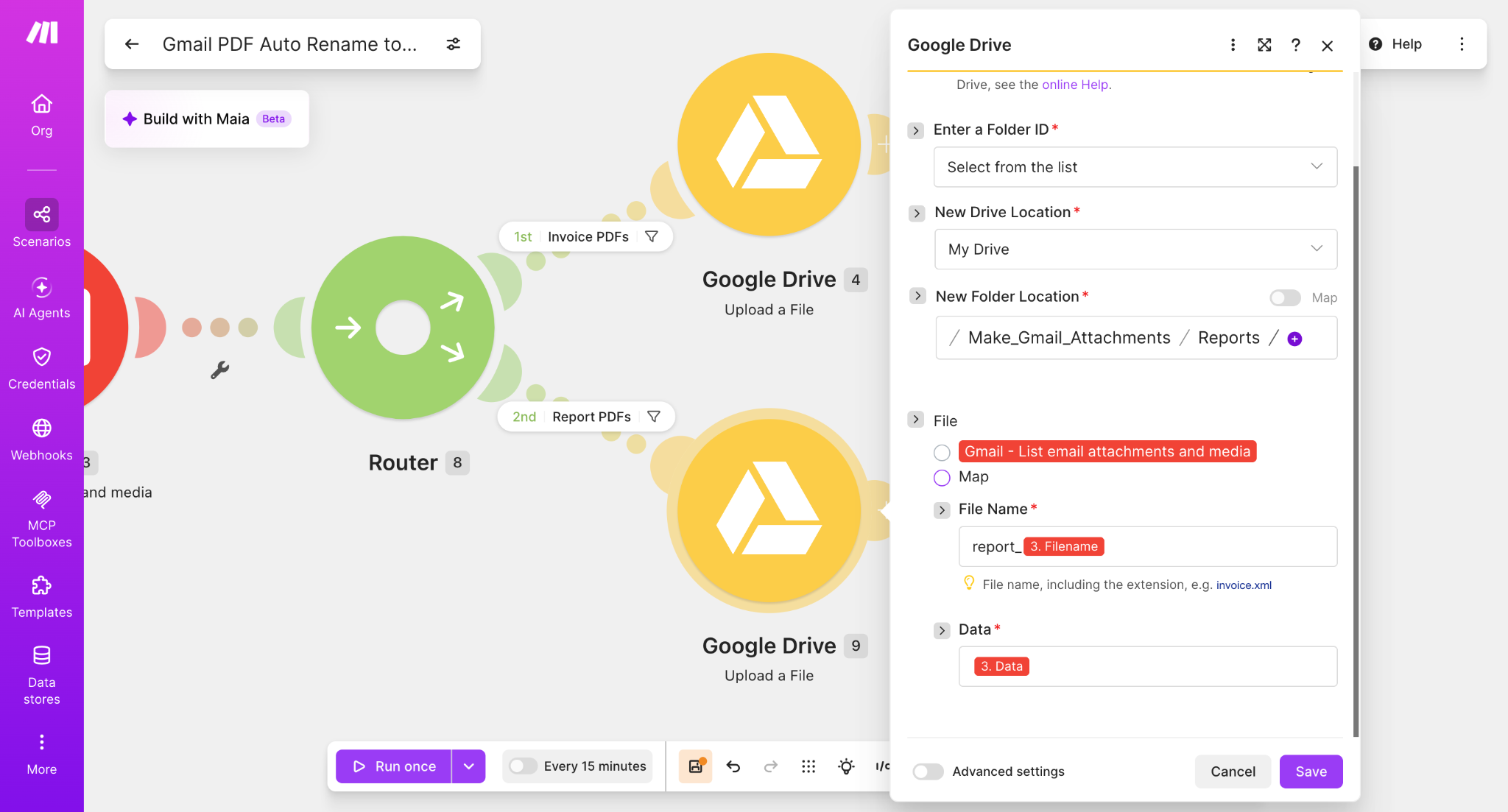
formatDate(now; "YYYY-MM-DD"), the fixed label Report_, and the original Gmail attachment filename.Check the date, extension and file data
- The mapped filename already includes
.pdf. Do not append it a second time. - Keep the attachment data mapped to the upload input; changing a filename is not a replacement for mapping the file.
- If the date differs from what you expect, check the organization's timezone. Make's date-function documentation explains the optional timezone argument.
- A date prefix is not a unique identifier. It does not by itself prevent duplicate uploads when a workflow is rerun.
The screenshots below document the original August 19 test. This update clarifies the instructions; it is not a new live workflow test.
Run the scenario
Run the scenario once and send test PDF emails matching each Router condition. The Make execution should pass the matching attachment through its route and upload the renamed PDF to the selected Google Drive folder.
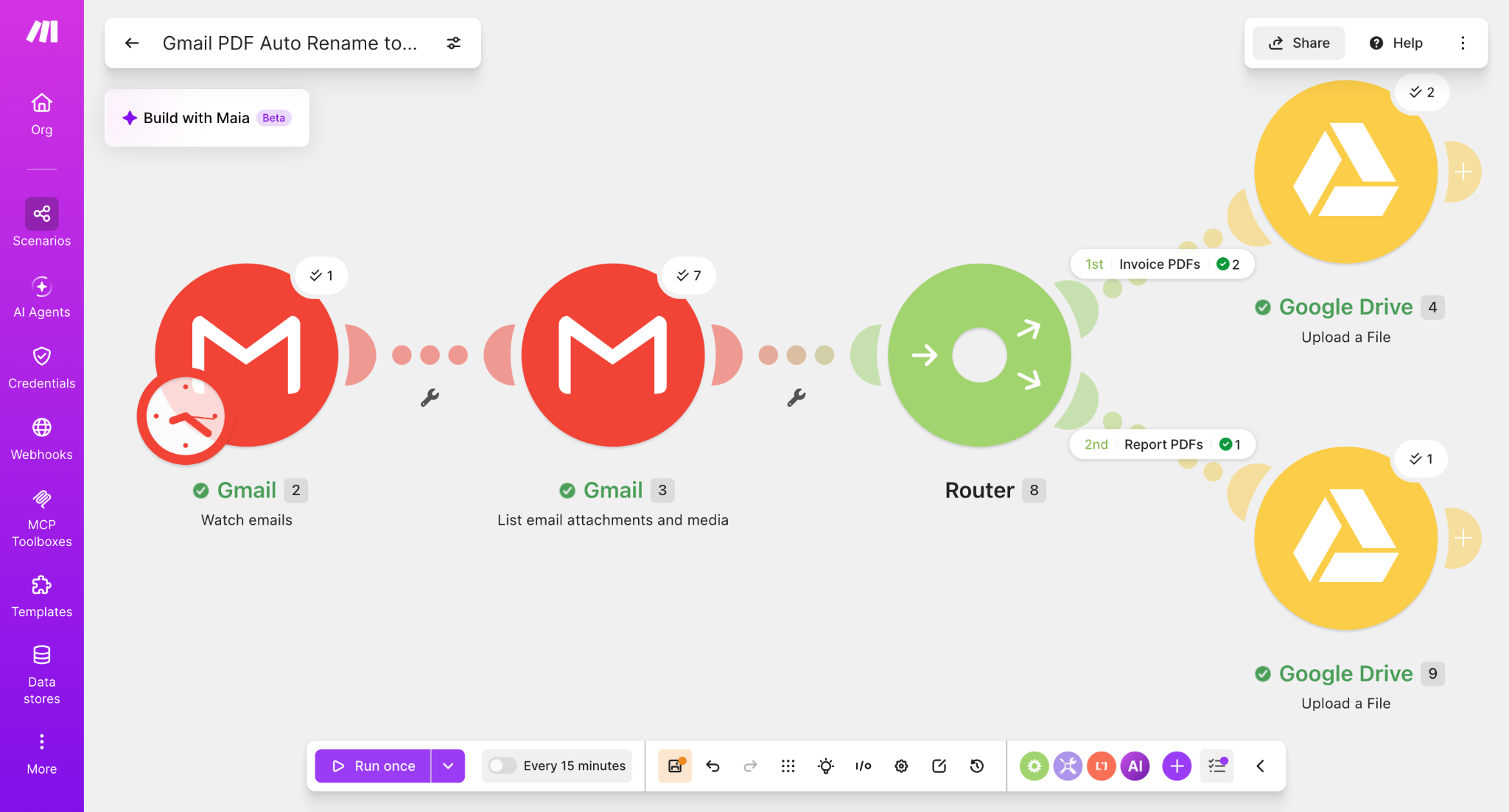
Test result: Invoice
The Invoice route successfully added the processing date and document type to the original filename.
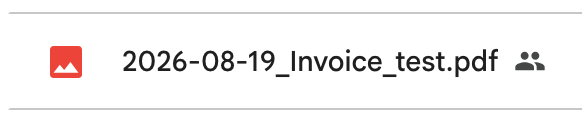
test.pdf became 2026-08-19_Invoice_test.pdf.Test result: Report
The Report route produced the same date-first naming convention with a different document label.
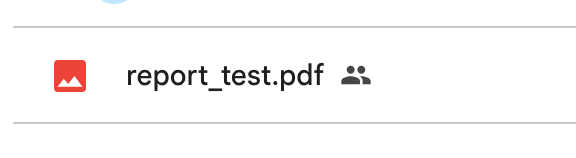
2026-08-19_Report_test.pdf.Why add the date to the filename?
A date-first naming convention makes archived files easier to scan and sort in Google Drive. It also keeps invoice and report files consistent even when their original attachment names are generic, such as test.pdf.
2026-08-19_Invoice_test.pdf
2026-08-19_Report_test.pdf
What we verified
- Invoice and report PDFs can share the same Gmail attachment workflow.
- Router filters can send each document type to a separate Google Drive folder.
- Make's
formatDate()function can insert the current date into the uploaded filename. - Fixed document labels such as
Invoice_andReport_can be combined with the original Gmail filename. - The original
.pdfextension is preserved because3. Filenamecontains it. - The date-prefixed Invoice and Report files were confirmed in Google Drive.
If regular use reaches a plan limit, compare the Free vs Core upgrade criteria before paying.
Gmail attachment renaming FAQ
Can Make automatically rename Gmail attachments?
Yes. Map the original Gmail attachment into the Google Drive upload module, then build a new filename from a date function, fixed text and the original filename.
Does this rename the attachment inside Gmail?
No. It changes the name of the copy uploaded to Google Drive. The original attachment stored in Gmail is unchanged.
Can I rename only PDF attachments?
Yes. Add a MIME-type filter for application/pdf. See the tested PDF-only workflow.
Final naming pattern
The completed workflow uses a simple archive-friendly structure:
YYYY-MM-DD_DocumentType_OriginalFilename.pdf
For example, an attachment named test.pdf processed on August 19, 2026 becomes 2026-08-19_Invoice_test.pdf or 2026-08-19_Report_test.pdf, depending on the Router branch.
Build the workflow
Start with the Router workflow, then add the prefix directly in each Google Drive module's File Name field.
Affiliate disclosure: Some links on Automation Lab Guide may be affiliate links. If you register through one of these links and later become a paying customer, we may receive a commission at no additional cost to you.